

Realtor.com Real Estate & Rent review
 Analysis by GetAllApps
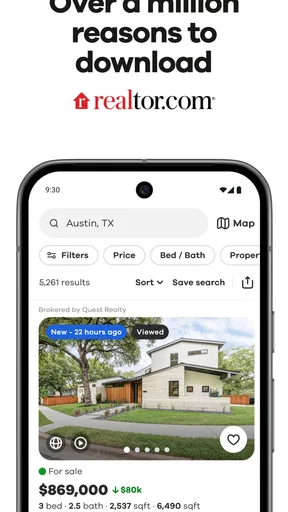
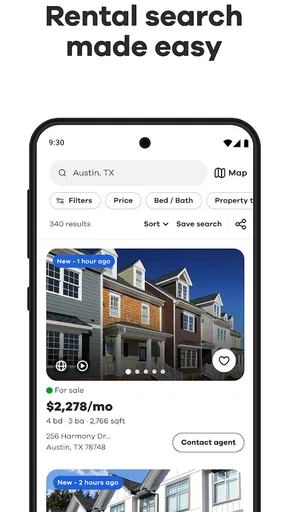
I would not keep a home-search app around just because browsing listings feels exciting for an afternoon. The better test is whether it remains useful once the first burst of curiosity passes: when I am comparing neighborhoods, checking whether a rental fits my routine, or revisiting a move that is still months away. Realtor.com Real Estate & Rent is built for that kind of recurring search, covering homes for sale and apartments for rent in one place. My impression is that it earns a spot on a phone most easily when a move is a real possibility, not merely a daydream.
Useful from the first search, if you know what you need
The appeal is immediate because the app focuses on a practical task rather than trying to turn home browsing into a social feed. I can approach it with a broad idea—renting, buying, or simply learning what an area offers—and narrow my attention as I figure out what matters. That makes it approachable for someone who is not yet ready to contact anyone, as well as for a person who has a clearer deadline and needs to compare options efficiently.
As a House & Home app from realtor.com®, it has a recognizable focus: property search rather than general household advice or home design. That distinction helps set expectations. It is most useful when the question is “What is available, and where?” It is less suited to someone looking for a broad guide to budgeting a move, decorating a room, or managing a home after purchase.
In the first few sessions, I would resist searching only by the most obvious feature, such as the number of bedrooms. A listing that seems promising on that basis may still be wrong for daily life. I find it more helpful to begin with a realistic location and budget, then compare the overall set of homes or rentals that remains. That approach makes the app a decision aid instead of a stream of attractive photos.
The app is free, rated for Everyone, and has a 4.7 average from around 569,000 ratings. Those figures suggest that it has broad appeal, but they do not tell me whether a particular listing suits my needs. I would treat the app as a way to organize and explore possibilities, then assess each property carefully rather than taking a polished listing presentation as a final verdict.
A practical routine beats endless scrolling
A realistic use case is a renter whose current lease is ending but who has not decided which neighborhood to choose. Instead of opening the app whenever there is a spare minute and scrolling without a goal, I would set aside a short session to compare areas, identify a few plausible options, and note what separates them. On another day, I could return with a more focused question: which location makes the commute or errands easier, and which property still looks appealing after considering its trade-offs?
That change in routine matters. Real-estate searches can become tiring because each listing asks for attention, yet many choices will not survive a closer look. I get more value by treating each visit as one step in a search: widen the pool when I am exploring, narrow it when I am ready to act, and stop when I have enough candidates to investigate outside the app. The goal is not to view everything; it is to make the next decision clearer.
For a buyer who is early in the process, the same habit can reveal how different areas affect the available choices. A search can be informative even when I am not ready to make an offer, provided I remember that browsing is only one part of due diligence. For someone who needs to move quickly, the app can help gather possibilities, but it should not replace arranging viewings, asking questions, or checking details through the appropriate real-estate professionals.
Why it can stay useful after the novelty fades
The strongest lasting value is that a property search changes as the user learns. At first, I may think I need a certain number of rooms or a particular style. After looking at actual options, I might realize that location, layout, or the balance between price and convenience matters more. Returning to the search with that revised understanding is more useful than repeatedly applying the same first guess.
Realtor.com Real Estate & Rent has been available since November 3, 2010, and it has more than 10 million installs. Its current version is 27.6.0, with a minimum operating-system requirement of 8.0. I see those details as signs of a long-running, widely used product, not a promise that every search result will match my expectations or that every local market will feel equally well represented.
For ongoing use, I would keep the app only while it supports a current project: planning a move, comparing places for a family member, or monitoring the kind of property that could become relevant later. If I am not actively considering a move, I would not make daily browsing a habit. The value is in returning when a question changes, not in checking listings out of reflex.
One useful discipline is to separate “interesting” from “actionable.” A home can be worth saving mentally as a reference point without being a serious candidate. I would note why it caught my attention—perhaps the neighborhood, the layout, or the kind of rental it represents—then compare it with realistic alternatives. This reduces the chance that a single appealing listing distorts my sense of what is available.
Keeping the search manageable
The maintenance burden is fairly light in the sense that this is a focused search tool, not an app that needs a complicated routine to be useful. The heavier work comes from the housing decision itself. I still have to decide what I can afford, which compromises are acceptable, and whether a listing’s details make sense for my circumstances. The app can help me look, but it cannot make those personal judgments for me.
I would also avoid leaving a search permanently broad. When too many kinds of homes or neighborhoods remain in consideration, every visit can feel like starting over. A better workflow is to revisit the criteria after a handful of searches: remove requirements that turned out to be unrealistic, keep the ones that genuinely affect daily life, and compare a small set of serious possibilities. That makes the app feel more like a working shortlist than a catalogue.
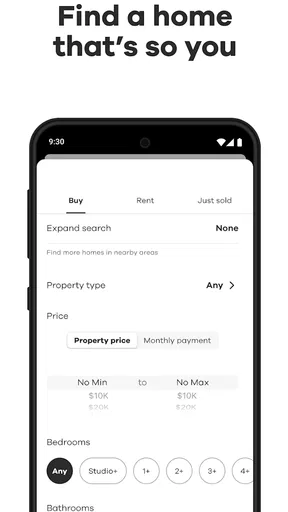
There is a useful trade-off between exploration and precision. Broadening the search can reveal areas I had not considered, but it also increases the amount of material to sort through. Narrowing too soon can hide alternatives that might fit better. I would begin with enough flexibility to learn, then tighten the search once I understand the local choices. This is especially helpful when I am new to an area and do not yet know which neighborhoods fit my routine.
Because the app is free, it is easy to try without committing money to a tool before I know whether it suits my search. That does not make every minute spent browsing worthwhile, though. I would use it with a purpose, particularly if listings start to blur together. A short, deliberate session is usually more useful than a long one where I keep opening options without deciding what I am trying to learn.
Where fatigue can set in
The main source of frustration is not unique to this app: property search involves uncertainty. A listing can look compelling on a screen and still fail to meet a practical need once I examine the details or consider the area in person. The app can bring options together, but I would not assume that browsing alone resolves questions about condition, suitability, or the realities of living there.
There is also a risk of turning the search into a comparison marathon. When I keep switching between homes with different locations and priorities, the differences become hard to remember. I would keep a simple note outside the app about the few things that matter most and use those same points when reviewing each candidate. That small step makes comparisons fairer and keeps attractive photos from becoming the deciding factor.
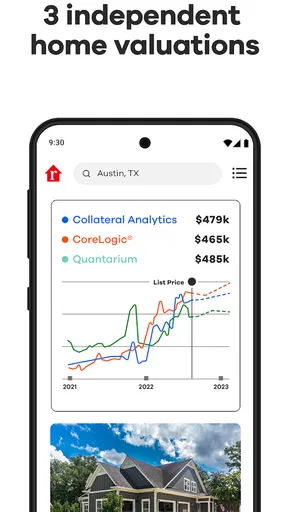
People who want a quick answer about whether they can afford a move may find the experience incomplete for their needs. A listing search can help establish what is worth investigating, but it is not a substitute for working through a personal budget or confirming the terms that matter to a rental or purchase. If my main task is financial planning, I would pair the search with a more suitable budgeting resource rather than expecting a property app to answer everything.
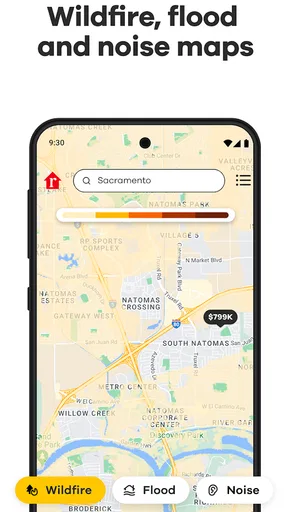
Likewise, if I only want broad neighborhood research without looking at specific homes or apartments, a map-focused or local-information tool may be a better starting point. If I am ready to evaluate a particular property in person, direct communication and a viewing matter more than another round of scrolling. The app fits best between those stages: it helps me discover and compare possibilities, but it should not become the whole moving process.
How it compares with other ways to search
The usual alternatives are browsing property sites in a web browser, relying on local contacts, or looking at separate services for rentals and homes for sale. This app’s appeal is straightforward: I can begin a housing search in a dedicated mobile experience rather than piecing together tabs or treating a general search engine as my property catalogue. Its combined focus on homes for sale and apartments for rent also suits people who have not settled on renting versus buying.
That convenience is not the same as being the right choice for every search. A person who already trusts a local agent or has a specific building in mind may get more useful answers by speaking directly with the people responsible for it. Someone comparing a narrow set of rentals may prefer whichever service has the clearest information for those particular options. I would use Realtor.com as a broad discovery tool, then verify important details through the channels relevant to the property.
Its scale is another reason to give it a try: it has 83,000 reviews, alongside its large audience and strong average rating. Still, a well-liked app can be a poor fit if I need a different type of information or if its approach does not match how I make decisions. I would judge it by whether it helps me create a manageable shortlist, not by its popularity alone.
Who should keep it installed
I would recommend it to renters and buyers who expect to search more than once, especially people comparing neighborhoods or still deciding what kind of move makes sense. It is also useful for a casual early-stage search, as long as “casual” means learning what is available rather than treating a listing as a commitment. The app’s free access makes that initial exploration easy, while its established audience gives newcomers a familiar place to begin.
I would skip it, or at least avoid relying on it as my main tool, if I have no housing decision on the horizon and know that browsing will only create noise. I would also look elsewhere for tasks centered on financial planning, local lifestyle research, or direct property negotiation. Those needs may sit beside a home search, but they are not the same job.
Overall, Realtor.com Real Estate & Rent earns lasting space when it supports a real search and when I use it with clear priorities. Its best quality is not that it makes a major decision effortless; it is that it gives me a focused way to explore options and return as my criteria become clearer. I would keep it installed during an active move, use it in purposeful sessions, and step away when the listings stop helping me decide what to do next.
Pros and cons
Pros
- Saved searches make it easy to revisit properties that match your criteria.
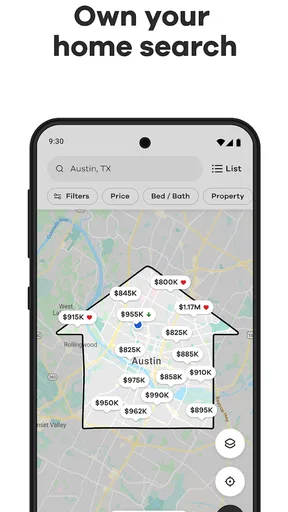
- Map and list views help compare homes across different neighborhoods.
- Listing alerts can keep you informed when matching homes change.
- Contact options make it easier to reach listing professionals.
- Rental listings are included alongside homes for sale.
Cons
- Listing details may not always reflect the latest changes.
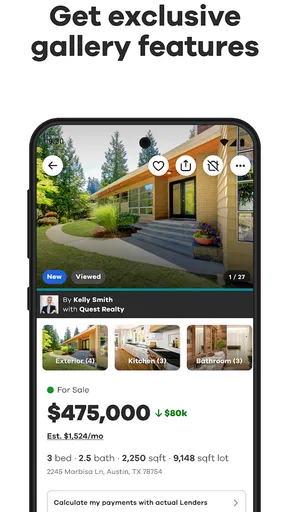
- Some homes may have limited photos or property information.
- Availability of listings can vary by location.
- Notifications may become frequent when many homes match your search.
- Some features may depend on location or listing participation.


